How to Blooket Login and Create a Account: A Step-by-Step Guide
Blooket remains one of the most popular ways for classrooms to turn quizzes into competitive games. Whether you are returning after a break or signing up for the first time, the process stays straightforward once you know the current steps.
Introduction
Welcome to the world of Blooket, where learning meets fun and excitement! Blooket is an engaging educational platform that combines gaming and learning, making it a favorite among students and teachers alike. Whether you're a seasoned Blooket user or new to the platform, we've got you covered. In this comprehensive guide, we'll walk you through the Blooket Login process and how to join Blooket games using a Blooket pin. Let's dive in!
Blooket is not just an online platform; it's an opportunity for students and teachers alike to engage, learn, and have fun together. Here's a heartfelt guide on how to log in and create your very own Blooket account.
Embarking on the Blooket Journey
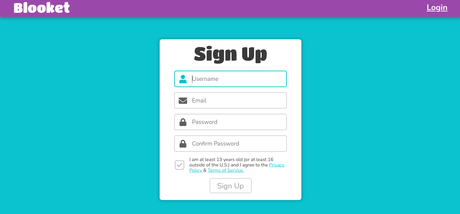
Visit blooket.com to start. Click the Sign Up button in the top-right corner. First choose whether you want a Student or Teacher account. Next enter your date of birth and confirm your location with the provided checkbox. After that, pick your signup method: email or Google. Provide the requested details, including a username and password, then finish by confirming you meet the age requirement.
The journey begins with a click. Head over to blooket Login and let the adventure unfold.
Navigating the Blooket Seas
Define Your Role. You can switch between Student and Teacher at any time through the settings tab. Your avatar remains fully customizable so you can create a look that feels like you. Once the profile is set, the dashboard shows available sets, recent games, and quick links to start playing.
Joining a Blooket Game Without an Account
Many students join live games without creating an account at all. Open play.blooket.com on any device, enter the six- or seven-digit Game ID shown by the host, scan the QR code, or click a shared join link. No login is required for basic participation. Accounts become necessary only when you want to host games, track personal stats, or collect Blooks.
Creating and Discovering Question Sets
Blooket hosts millions of public sets that anyone can browse. Use the Discover tab to search by subject, grade level, or keyword. Once you find a set you like, you can play it immediately, copy it to your library, or edit the questions. Teachers and students both create original sets by selecting Create on the dashboard, adding questions one by one or importing from spreadsheets.
Hosting Your Own Game
Take the Lead. Return to blooket.com, locate the set you want to use, and open its page. Click the Host button. Choose your preferred game mode, adjust optional settings such as random player names or late join, then launch the lobby. A six- or seven-digit Game ID appears along with a QR code and a shareable link. Send any of these options to participants so they can join quickly.
Blooket Plus Subscription Tiers and Perks
Blooket Plus removes the standard player cap and unlocks extra modes, folder organization, and deeper analytics. Hosts can run games with up to 300 players at once. Pricing sits at roughly $4.99 per month or $59.88 when billed annually. The free tier still supports the majority of classroom activities, so many users test the waters before upgrading.
Returning to the Blooket Shores
Come Back Anytime. To log in, head to blooket.com or visit the dedicated login page at id.blooket.com/login. Enter your email and password or choose the Google sign-in option. Click Log In to re-enter your account and pick up where you left off.
Rediscovering Your Path
Forgot Your Way?
If you've forgotten your password, fear not. Go to the Blooket login page at https://id.blooket.com/login. Click on "Forgot Password?" and follow the steps provided in the email.
Playing Solo Games on Blooket
Solo mode lets anyone practice without waiting for a live session. Open any set, select the Solo button, and choose a game mode. The experience mirrors live play but runs on your own schedule. Students often use solo rounds for homework review or to prepare for upcoming class tournaments.
In Conclusion
Blooket is more than just a platform; it's a community of passionate educators and eager students reshaping education. Dive in, explore, and let learning take on a new dimension.
FAQs
What is Blooket's premium subscription? Blooket Plus unlocks up to 300 players per game, exclusive modes, folders, and enhanced reports. Monthly pricing starts around $4.99 or $59.88 annually.
Can I change my role from student to teacher or vice versa? Yes. Switch roles anytime through the settings tab without losing progress or sets.
Are there age restrictions for using Blooket? Users must be at least 13 in the United States or 16 outside the country to create an account. Younger students may join live games without accounts or create accounts with verified parental or school consent.
Can I host a game on Blooket with specific settings? Yes. Hosts can toggle random names, late join, and other options before the game starts.
How can I reset my Blooket password? Visit the login page at id.blooket.com/login and click Forgot Password, or request a reset directly from your account settings.
Do I need an account to join a live game? No. Students can enter any live game using the Game ID, QR code, or link without signing up.
Can I play Blooket by myself? Yes. Every set offers a Solo option so you can practice or review on your own time.