




Make Your Own Talking Avatar with AI: A Simple Creator Guide
A talking avatar gives you a presenter-style video without filming yourself every time. You can start with a portrait, add a short script, choose the format, and generate a clip that speaks to camera for product explainers, lessons, launch updates, ads, and social posts.
This guide shows how to create talking avatar videos with insMind, from choosing a clean portrait to writing a natural script and downloading a publish-ready video.
What Is a Talking Avatar?
A talking avatar is an AI-generated presenter video made from a portrait, avatar, or character reference plus a script. AI animates the face, mouth, and expression so the avatar appears to deliver your message on camera.
Unlike a static profile image, a talking avatar can introduce a product, teach a quick lesson, answer a common question, or narrate a campaign message. It gives content a human-style delivery without a full video shoot.
Why Make Your Own Talking Avatar?
Speed is the biggest advantage. If you need a product update, training clip, ad variation, or social hook, a talking avatar can move from script to finished video much faster than traditional recording.
It also helps with consistency. You can reuse the same presenter look across product pages, lessons, campaigns, and localized versions. If you do not have a presenter image yet, you can make an avatar from a photo and then animate it.
Talking avatars are also helpful when you want a speaker-led format without showing your own face. They work well for faceless content, ecommerce explainers, onboarding videos, and multilingual announcements.
How to Make Your Own Talking Avatar with insMind
The basic path is straightforward: upload or choose an avatar, add a script, select output options, generate the clip, then download it for the platform you need.
Step 1: Choose an Avatar and Add Your Script
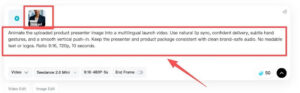
Upload a clear portrait or choose an avatar style that fits your message. A front-facing image with good lighting and a visible mouth gives AI the best information for natural speech animation.
Paste a focused script. A short launch message, product intro, lesson summary, or social hook is easier to deliver than a dense paragraph. If you need a specific tone, describe the voice, language, accent, and delivery style.
Example prompt: Animate the uploaded product presenter image into a multilingual launch video. Use natural lip sync, confident delivery, subtle gestures, and a smooth vertical push-in. Keep the presenter and product package consistent with clean brand-safe audio.
Step 2: Set Video Format and Output Options
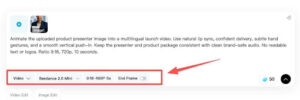
Choose the format based on where the video will appear. Vertical 9:16 works well for TikTok, Reels, Shorts, and mobile-first ads. Horizontal video fits landing pages, product demos, webinars, and presentations.
Pick a duration that matches the script. Short avatar videos can work well at five to ten seconds for hooks or announcements. Longer explainers need a slower pace and a clearer structure.
Step 3: Generate the Talking Avatar Video
Generate the video once the portrait, script, and settings are ready. insMind will create synced mouth movement, facial animation, and presenter-style motion from your input.
Preview the clip before downloading. Watch the mouth movement, expression, body motion, and pacing. For stronger speech timing, a
can help the avatar follow the words more closely.
Step 4: Download and Publish Anywhere
When the result looks right, download the final clip. You can use it on social media, product pages, ecommerce stores, ad campaigns, online courses, landing pages, or internal training materials.
Save the portrait, tone, format, and prompt pattern if you plan to create a series. Reusing those pieces makes future avatar videos faster and more consistent.
Tips for Better Talking Avatar Results
- Use a clear, well-lit, front-facing portrait with a visible mouth.
- Write a script that sounds natural when read aloud.
- Describe tone, speed, language, facial expression, and camera framing.
- Keep the first test short before generating longer versions.
- Avoid changing the avatar, background, gestures, and language all at once.
For broader campaigns, an AI video creator can help you build supporting product clips, scene visuals, and short social assets around the avatar.
Common Mistakes to Avoid
A weak portrait, overlong script, unclear voice direction, or overloaded prompt can make a talking avatar feel stiff. Start with one presenter, one message, and one intended platform.
- Do not use a cropped, blurry, or heavily shadowed portrait.
- Do not write more speech than the video duration can support.
- Do not leave the tone undefined if the delivery matters.
- Do not ask for large visual changes and precise lip sync in the same first test.
Best Uses for AI Talking Avatars
Talking avatars are especially useful when you need a consistent presenter for recurring content. They can support product explainers, launch announcements, online lessons, onboarding clips, support answers, ad variations, and social videos.
For business-facing videos, an AI spokesperson video format can work well when the goal is a polished host delivering a clear message with a professional tone.
FAQ About Making Your Own Talking Avatar
Can I make a talking avatar from one photo?
Yes. Upload one clear portrait, add a script, choose settings, and generate a talking avatar video with AI.
What kind of portrait should I upload?
Use a sharp, well-lit image where the face and mouth are visible. Avoid heavy shadows, side angles, and face coverings.
Can my avatar speak different languages?
Yes. Describe the language, tone, and speaking style in the prompt when creating the video.
How do I make the lip sync look more natural?
Keep the script short, use a clear portrait, and give specific speaking-style instructions. Clean audio can also help.
Where can I publish talking avatar videos?
Use them on TikTok, Reels, Shorts, product pages, landing pages, ecommerce stores, ad campaigns, courses, and training materials.
Start Making Your Own Talking Avatar Today
Start with a clean portrait, write one focused script, choose the right format, and generate a talking avatar with insMind. Once you find a style that works, reuse it to create more presenter-led videos without filming every clip from scratch.
